Automated ICD-10 Coding for EMR Data
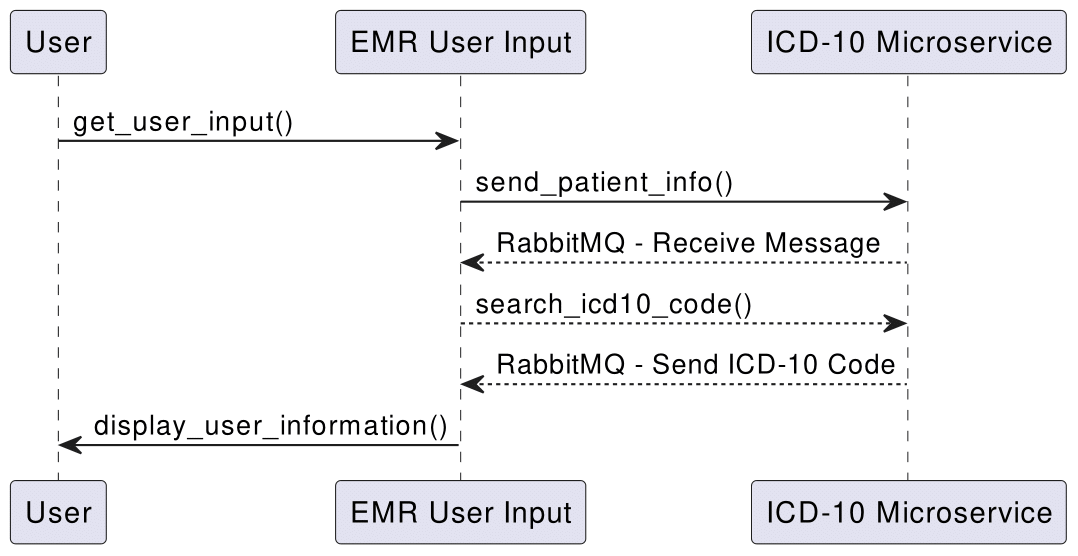
This microservice suite allows the submission of patient information—including chief complaints—and automatically returns the corresponding ICD-10 codes. The communication between the sender (EMR User Input) and the receiver (ICD-10 Processor) is handled via RabbitMQ.
Prerequisites
- RabbitMQ: Install RabbitMQ locally or on a server.
- Python Libraries: Install
pikaandrequestsviapip install pika requests
Communication Contract
Sending Data (EMR User Input)
Endpoint: RabbitMQ Queue – chief_complaints_queue
Payload: JSON object containing user information:
{
"name": "John Doe",
"dob": "1990-01-01",
"age": 32,
"gender": "M",
"chief_complaints": "Chest pain",
"vitals": {
	"hr": 75,
	"bp": "120/80",
	"rr": 18,
	"o2_saturation": 98,
	"temperature": 98.6
},
"eta": 15,
"los": "ALS"
}
Receiving Data (ICD-10 Processor)
Response:
The ICD-10 microservice prints the received chief complaint and its corresponding ICD-10 code:
[x] Received Chief Complaint: Chest pain
[x] Corresponding ICD-10 Code: I20.9
UML Sequence Diagram
Example Call
-
Send Patient Information (EMR User Input):
Runemr-user-input.pyand enter patient details as prompted. After entering all information, choose option0to submit. The patient data, including the chief complaint, is sent to the microservice via RabbitMQ. -
Receive and Process (ICD-10 Processor):
Runreceive.py. The microservice consumes messages from the RabbitMQ queue and prints the received chief complaint with its ICD-10 code.
Interest in More?
Source Code: Automated ICD-10 Coding for EMR Data