Patient Charting Database
Project Title: Patient Charting Database
Technology Used: Flask, Python
Overview
The Evergreen Health Clinic is transitioning from a paper-based chart system to a digital database to efficiently manage its increasing patient base. This system handles critical data such as patient contact details, diagnoses, and treatments, enhancing patient care and streamlining operations.
Database Design Process
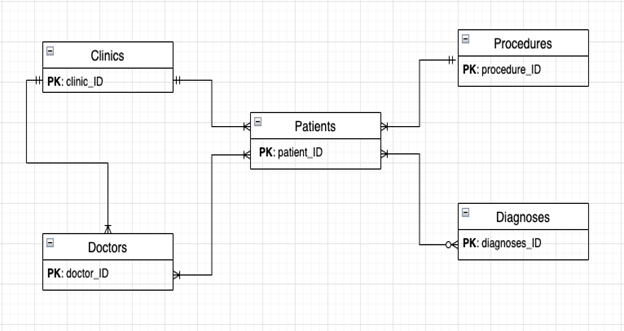
The design focuses on normalization to ensure data integrity and minimize redundancy. The main entities include Clinics, Patients, Doctors, Diagnoses, and Procedures. Each entity is linked using primary and foreign keys to maintain structured relationships.
Database Outline
The system includes the following tables:
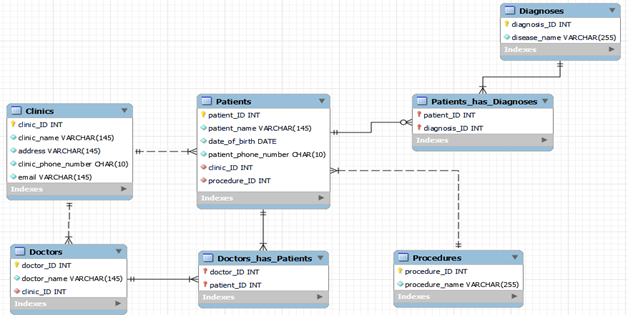
- Clinics: Contains clinic_ID, clinic_name, address, clinic_phone_number, and email.
- Patients: Records patient_ID, patient_name, date_of_birth, patient_phone_number, clinic_ID, diagnosis_ID, and procedure_ID.
- Doctors: Maintains doctor_ID, doctor_name, and clinic_ID.
- Diagnoses: Lists diagnosis_ID and disease_name.
- Procedures: Contains procedure_ID and procedure_name.
Entity-Relationship (ER) Diagram
The ER diagram below illustrates the relationships among the entities, including one-to-many and many-to-many relationships.
Schema and Normalization
The schema was designed with normalization in mind:
- 1NF: Primary key attributes are defined for all tables.
- 2NF: All non-key attributes fully depend on the primary key.
- 3NF: Transitive dependencies have been removed to maintain data integrity.
Major Changes and Implementation Steps
- Server Migration: Migrated from the FLIP server to the Classwork server to address internal server errors and improve reliability.
- Schema Adjustments: Implemented auto-increment for primary keys and enforced non-NULL constraints to prevent errors.
- Field Mapping and Data Handling: Corrected field mappings for update operations and included invisible fields for primary keys.
- User Interface Enhancements: Added CSS styling, dropdown menus for foreign keys, and mandatory fields to improve usability.
Sample Data
Examples of records in the system:
Clinics:
1  Evergreen  123 Fake St, Seattle, WA  2064445599  evergreen@aol.com
2  Rainier   467 Sike St, Burien, WA   4259998787  rainier@hotmail.com

Doctors:
256  Dr. Lawrence  (Clinic 1)
678  Dr. Timothy   (Clinic 1)
901  Dr. Larry     (Clinic 2)

Patients:
999  Hasselhoff, Lam   1995-11-15  2062434484  (Clinic 1)
1000 Steel, Rick      2003-05-28  4256619092  (Clinic 2)
User Interface
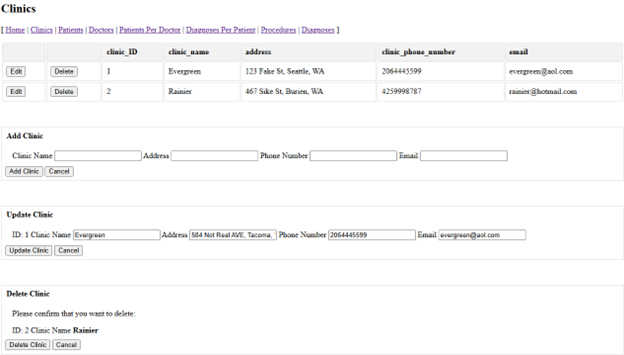
The application supports full CRUD operations:
- Clinics Page: View, add, edit, and delete clinics.
- Diagnoses Page: Manage diagnoses with similar CRUD operations.
- Doctors Page: Manage doctor records and their patient associations.
- Patients Page: Handle patient records, including optional diagnosis entries.
- Procedures Page: View, add, edit, and delete procedures.
- Patients Per Doctor Page: Manage many-to-many relationships between patients and doctors.
- Diagnoses Per Patient Page: Update and delete patient diagnosis relationships.
Conclusion
The project has evolved significantly, resulting in enhanced server stability, improved database integrity, and a user-friendly interface. These changes empower Evergreen Health Clinic to manage its growing patient base effectively and deliver high-quality healthcare.
Project Documentation
Interested in More?
Source Code: Patient Charting Database